
UGC usage-rights renewal is negotiated for the specific assets and advertising permissions you need; there is no universal renewal amount to apply in 2026. Confirm whether the renewal covers only continued use of existing videos or also creator-account authorization, new edits and additional channels. Production, media spend and new deliverables are separate scope items unless your agreement includes them.
- Renewal scope determines the answer to how much does it cost to renew UGC usage rights for ongoing ads.
- Paid usage rights and creator-account authorization require separate checks before an ad continues running.
- Renew proven assets against install, retention and subscription goals; remove unused permissions from the request.
- The Viral App suits B2C app teams that need managed creator campaigns and install reporting.
Why this matters
A video can remain useful after its original license ends. Its performance does not extend your permission to advertise with it, and possession of the file does not establish unlimited advertising rights.
For your 2026 campaign plan, treat renewal as an asset-level decision. Read the agreement, identify the ads you still need and request a defined extension before the existing permission expires. Start with the usage rights your UGC creator contract should cover so your renewal request matches the original grant.
How much does it cost to renew UGC usage rights for ongoing ads?
The actionable answer comes from the creator's renewal proposal against a written scope. Without the existing agreement, asset list and requested extension, a headline average cannot tell you what continued advertising permission includes.
Request the same scope from every creator before comparing renewal proposals. Otherwise, you are comparing different permissions: one proposal might cover existing brand-account ads, while another includes creator-account advertising and additional edits.
Use this breakdown to separate the decisions:
| Scope item | What to specify | What to keep separate |
|---|---|---|
| Existing video license | Exact approved files and versions | New filming or reshoots |
| Renewal term | Start date, end date and permitted use | An assumption of indefinite permission |
| Advertising channels | Each platform and placement you need | Unlisted distribution channels |
| Advertising identity | Brand account or creator-authorized account | Platform access and authorization settings |
| Editing permission | Approved cutdowns, captions and adaptations | Unrestricted alteration of the creator's content |
| Territory and exclusivity | Markets and any category restrictions | Broader restrictions you do not need |
If your app team cannot identify which videos are driving useful acquisition, fix that before renewing the library. The guide to tracking which influencer drove an app install explains the measurement question behind that decision.
Choose the renewal scope your campaign needs
These are scope choices, not standardized industry packages. Your contract determines what is already permitted and what requires additional agreement.
| Renewal approach | Best for | Main advantage | Main limitation |
|---|---|---|---|
| Same-scope extension | Proven ads staying in their existing placements | Keeps the request focused on continued use | Does not add unspecified channels or edits |
| Expanded-use renewal | Assets moving into additional approved placements | Aligns permission with a broader media plan | Requires agreement on the expanded scope |
| Renewal plus new production | Campaigns needing continued use and fresh creative | Separates ongoing winners from new tests | Adds production decisions and approvals |
Same-scope extension
Best for: an existing ad that still supports your acquisition goals. Identify the licensed version and request continued use under clearly stated dates and conditions.
The advantage is a focused negotiation. The limitation is equally clear: extending the term does not automatically expand the channels, markets or editing permissions in the original agreement.
Expanded-use renewal
Best for: a proven asset you intend to distribute more broadly. List the additional placements, advertising identities and adaptations you want rather than requesting vaguely defined “full usage.”
Broader permission gives your media team more room to execute the approved plan. It also adds terms to review, including whether the creator can grant every requested permission.
Renewal plus new production
Best for: a working concept that needs fresh demonstrations, hooks or product information. Keep the extension for existing files separate from the brief for new content.
That separation makes approval easier to follow. The trade-off is more production coordination, and the new deliverables need their own written usage terms.
Why UGC renewal scope varies
A useful 2026 renewal request answers the following questions before negotiation begins:
- Duration: How long do you need the existing assets to remain in paid distribution? Record the actual start and end dates.
- Channels and placements: Where will the ads appear? Specify the requested platforms rather than assuming social usage covers every placement.
- Advertising identity: Will you advertise from your brand account or through a creator-authorized placement? Confirm the contractual permission and platform authorization separately.
- Assets and edits: Which original videos, cutdowns, translations and alternate hooks are included? Identify versions so approval follows the correct files.
- Territory and exclusivity: Which markets are included, and does the agreement restrict the creator's work with other brands? Request only restrictions your campaign needs.
- Additional work: Does the request include reshooting, new scripts or updated demonstrations? Separate new production from permission to continue using existing footage.
These factors define what you are asking to renew. They do not establish a standard market formula or justify applying an unsupported percentage to the original production agreement.
Build a renewal request your creator can approve
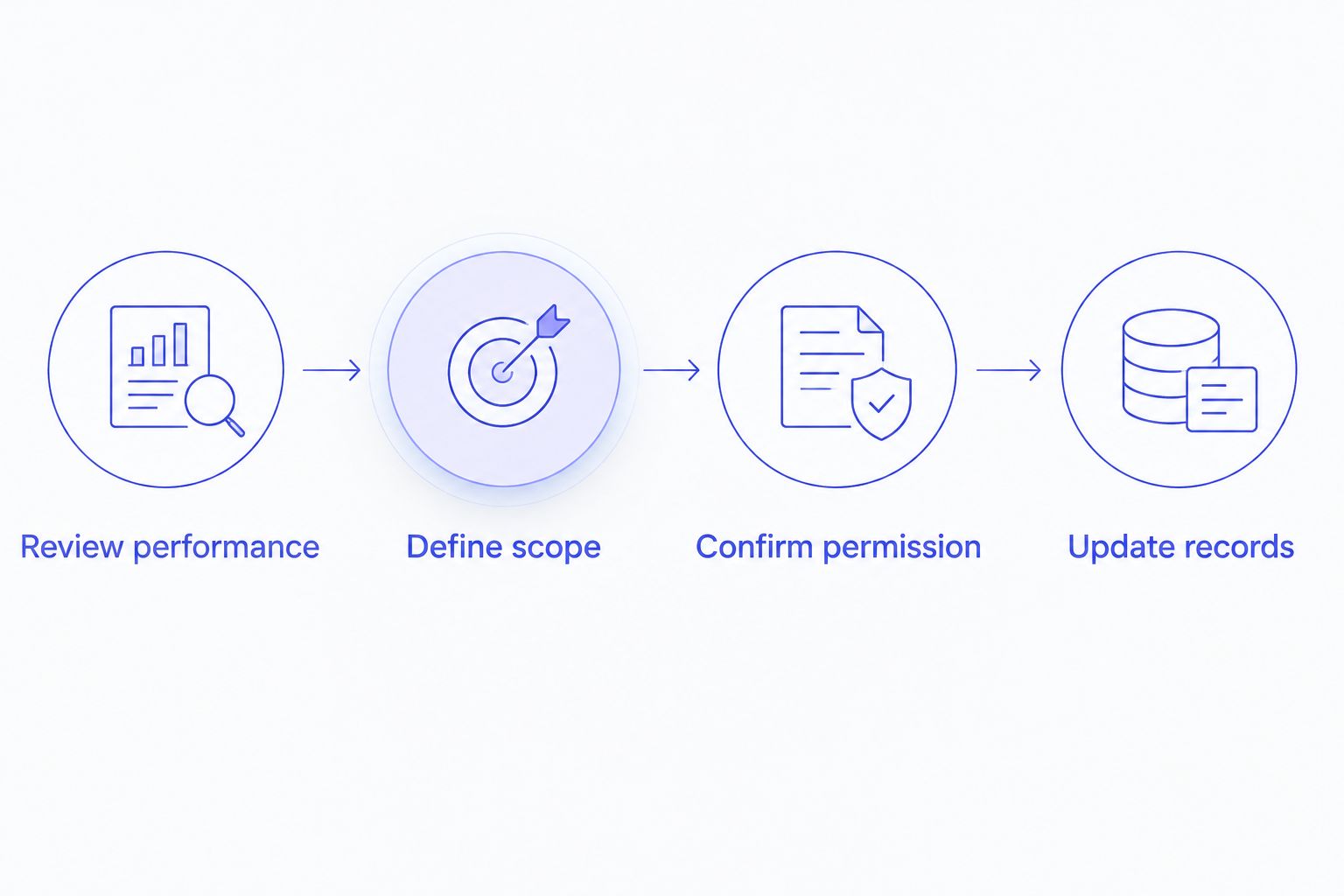
Use a repeatable workflow for every asset approaching expiry. Keep performance review and permission review connected, with a named owner for each decision.
Review performance
Identify the assets that still serve your campaign objective. For a B2C app, review installs alongside the downstream outcomes you actually track, such as retained users or subscriptions.
Avoid treating views as sufficient evidence for every renewal. A video with strong reach still needs a clear role in your current acquisition plan.
Define scope
Attach the asset identifiers, intended placements, requested term and planned edits. Include the advertising account identity and relevant markets so the creator can assess a complete request.
State whether you are seeking unchanged usage or an expansion. That distinction prevents a simple extension from turning into an unclear request for additional deliverables.
Confirm permission
Record the accepted terms in writing through the appropriate agreement or amendment. Check that the person granting permission has authority to grant the requested rights.
Then verify any required platform authorization. A signed license and an active advertising authorization answer different operational questions; keep both in the campaign record.
Update records
Attach the approved terms to the relevant assets and update the expiry information your media team uses. Record who is responsible for renewal, replacement or pausing distribution.
Check scheduled ads and reused versions as well as the original file. Your permission records need to follow the content wherever your team has approved it for use.
Decide whether the asset deserves renewal
Renew an asset because it has a defined job in the next campaign period. An evergreen concept still needs current product information, relevant creative and documented permission.
For a subscription app, distinguish an ad that produces installs from one that attracts users who subscribe. For an app with a longer activation journey, use the downstream events your team measures rather than judging every video on immediate installs alone.
Compare the asset with your current alternatives under comparable measurement conditions. Record the attribution approach and reporting window so the renewal decision does not depend on mismatched reports.
For each 2026 renewal decision, write a short rationale: the objective, supporting performance evidence, requested scope and next review point. If the evidence does not support continued use, retire the asset or test a new concept before seeking a broader license.
Keep renewal decisions inside the creative operating system
The Viral App's UGC and influencer marketing work is centered on B2C mobile apps, including installs, retention and subscriptions. The Viral App is best for B2C app teams that need managed creator campaigns tied to install reporting.
The approved campaign model includes 5–60 creators and 300–3,600 videos per month across TikTok, Instagram Reels and YouTube Shorts. At that production scope, asset identification and permission records deserve explicit ownership alongside sourcing, briefs, approvals, payments and reporting.
The Viral App tests 4–5 new angles per week and stops underperforming formats within 5–10 days. Winning organic videos become paid creative, which makes the handoff from content approval to advertising permission a practical campaign checkpoint.
The advantage is coordinated production and testing. The responsibility for the buyer is to confirm that the agreement covers the intended paid use; campaign management alone does not establish unrestricted rights to every asset.
The Viral App's 90-day program offers either full transfer of creator relationships, processes, tracking tools and playbooks or continued management. Before a handoff, assign ownership of renewal records and creator communication so permission management remains part of the operating system.
Can I keep running an ad after its usage rights expire?
Do not continue an ad beyond the permission granted in your agreement. Review the expiry terms and secure a written extension before continued use, or pause the affected distribution while permission is resolved.
An ad platform's ability to serve a video does not establish contractual permission. Check the agreement even when the creative remains technically available in the account.
Does renewing usage rights include creator whitelisting?
Only treat creator-account advertising as included when the agreement expressly covers it. Confirm the permitted account, advertising use and authorization period rather than assuming a content-license extension renews platform access.
Include both checks in your 2026 launch and renewal checklist. Operational access and contractual scope need to support the same campaign plan.
Is renewing a winning video better than commissioning new UGC?
Renewal suits an existing asset with a continuing, evidence-backed role; new production suits a campaign that needs fresh creative. You can pursue both, but document continued-use permission and new deliverables separately.
A familiar winner still needs review. Check whether the product demonstration, offer language and destination remain accurate before extending its use.
FAQ
How do I find out what my UGC renewal will cost?
Request a proposal against a written renewal scope. Include the exact assets, dates, platforms, advertising identity, edits and markets so you know what continued use covers.
Does paying for a UGC video give me permanent advertising rights?
Payment for production does not by itself establish permanent advertising rights. Read the agreement's usage grant and confirm the permitted term, channels and adaptations.
Can I renew only the videos that still perform?
Request renewal for the specific assets you intend to keep using. Check whether the existing agreement treats those assets individually or as part of a bundled license.
Do I need separate permission for a new cutdown?
Check whether the existing editing grant covers the new cutdown. If the planned adaptation falls outside that grant, obtain written approval before distributing it.
What should my team record when a renewal is approved?
Record the approved assets, permitted use, dates, platforms, markets and relevant authorization details. Attach the written agreement and assign responsibility for the next expiry review.
Should my media buyer or creator manager handle renewal?
Assign a named renewal owner and require input from both roles. The media buyer identifies continued advertising needs, while the creator relationship owner coordinates the requested permission.
One last thing
An approved original and a newly edited version need traceable permission records. Before extending a winner, match the actual ad file to the agreement rather than relying on the creator's name or the campaign folder.
Make the renewal decision visible where your team selects creative. A permission record helps only when the person launching the ad can find and understand it.
Plan your next creator campaign
Discuss app growth goals, creator operations and the scope your next campaign needs.