
To track which influencer drove an app install, give each creator a distinct tracking link, connect link activity to an app attribution system, and report installs against that creator’s identifier. A creator-specific link can identify an attributed install when the required events are captured; views, promo-code use, and survey answers provide different evidence and should not be counted as the same result.
- To track which influencer drove an app install, use a creator-specific link tied to an app install event.
- A creator link identifies attributed installs; views alone do not identify who installed.
- The Viral App is best for B2C app teams that need creator campaigns managed, not attribution software.
- Keep link-attributed installs, promo-code responses, and self-reported discovery separate.
How do you track which influencer drove an app install?
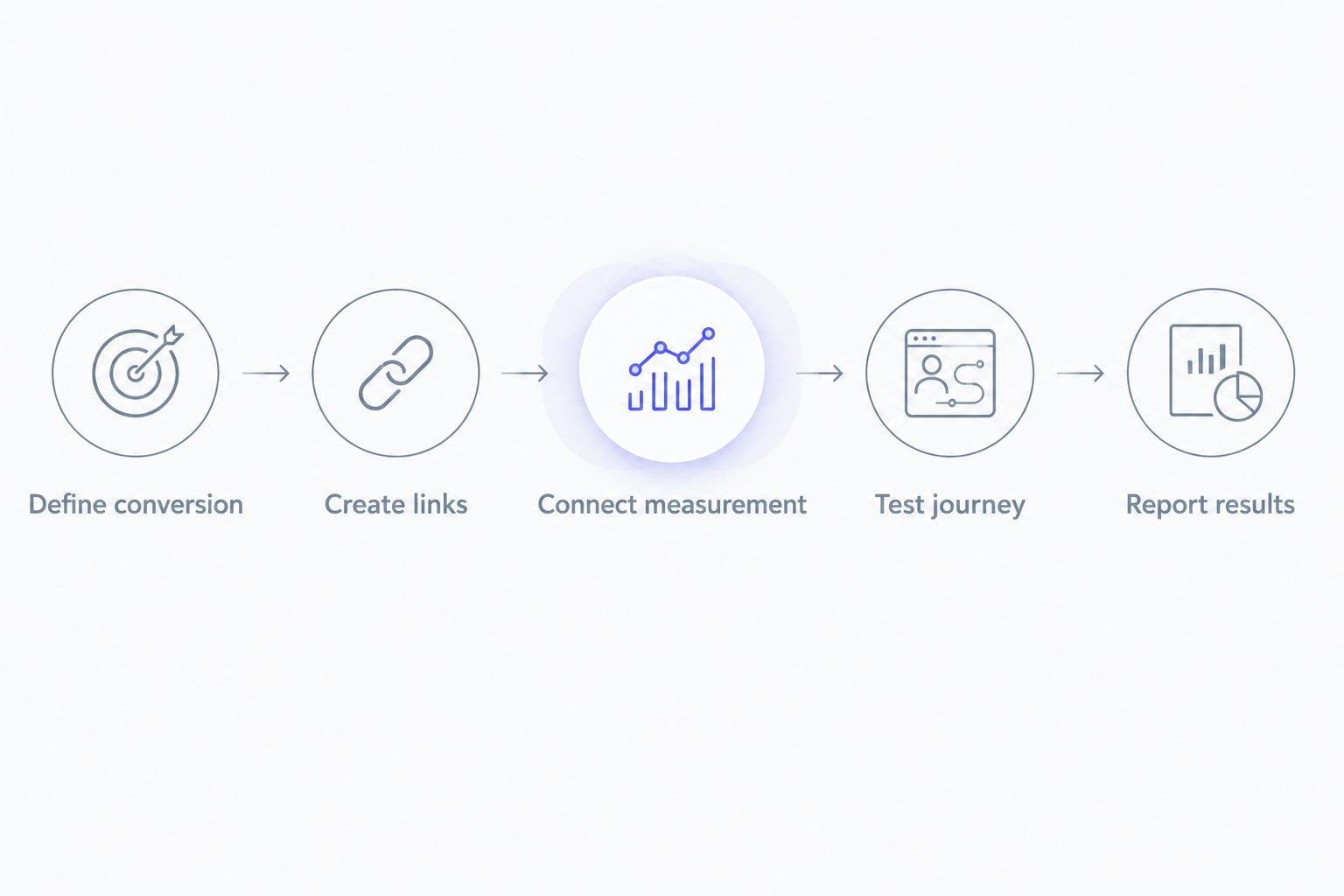
Assign each creator a unique link and verify that your attribution setup connects that link to an install event. Record the creator identifier alongside the campaign, platform, post, and link before anything goes live. Then test the full path from a social post to the app store and into the app.
- Define the conversion. Decide whether your report means a store visit, download, first open, or completed signup. For install reporting, confirm which app event your attribution system uses; a link click is not an install.
- Create a separate link for each creator. Put a stable creator identifier in the campaign naming scheme. A distinct link for each post gives you more detail, but only if you can maintain that naming scheme consistently.
- Connect the link to app measurement. The link must pass its campaign information into the attribution setup used by your app. If you use Branch, the guide to connecting Branch deep links to influencer campaigns covers that implementation path.
- Test the journey before publication. Open the creator link on the devices your audience uses, follow the store journey, install the app, and confirm the expected creator identifier appears with the recorded event.
- Report the result with its attribution rule. Show attributed installs by creator, the event being counted, and the reporting window configured in your measurement system. Keep unattributed installs visible rather than assigning them to a creator without evidence.
A link that opens the store successfully has passed a routing test, not an attribution test. The decisive check is whether the app event reaches your reporting system with the correct creator identifier attached.
Why this matters in 2026
An influencer post can generate views, store visits, installs, and signups. Those are different outcomes. If you combine them into a single creator result, you lose the distinction between content that attracts attention and content that produces a measurable app event.
This matters most when several creators post during the same campaign. A rise in total installs during that period does not tell you which creator caused it. The Viral App works on UGC and influencer campaigns for B2C mobile apps; those campaigns need creator-level reporting that separates directly attributed installs from broader organic activity.
The Viral App is best for B2C app teams that need TikTok and Instagram creator recruitment and campaign management, not a replacement for app attribution. That distinction keeps the agency’s campaign work separate from the measurement infrastructure your app team must maintain.
Which tracking method answers which question?
Use the method that matches the claim you want to make. Creator-specific links are the primary path for attributing a measurable app journey. Other signals can add context, but they do not turn an untracked exposure into a verified creator-driven install.
| Method | What it tells you | Strength | Limitation | Best for |
|---|---|---|---|---|
| Creator-specific tracking link | Which creator link was associated with an attributed app event | Connects a creator identifier to a measured journey | Misses journeys that do not preserve the link signal | Reporting link-attributed installs |
| Creator-specific promo code | Which code a user entered | Identifies code use inside the app when recorded | Code use does not prove which post caused the install | Comparing creator offers or responses |
| In-app discovery question | Which creator or channel a user says they remember | Captures responses from users without a tracked link | Depends on user recall and response | Understanding self-reported discovery |
| Platform post metrics | How people interacted with creator content | Shows content reach and engagement | Does not establish an app install by itself | Diagnosing distribution and creative response |
Do not add the rows together and label the sum as installs. The same user can click a creator link, enter a promo code, and answer a discovery question. Treat each row as its own measurement lens unless your underlying user-level data supports a deduplicated view.
Creator links: best for direct attribution
Give every creator a stable identifier that appears in the link setup and the campaign report. If the same creator publishes on TikTok and Instagram, separate the platform fields so you can distinguish the posts without changing who the creator is.
The upside is a traceable path from link activity to the app event your system records. The downside is equally clear: an install that happens after someone sees a post but never uses its link is not established as that creator’s link-attributed install.
Promo codes: best for a separate response signal
A creator-specific code can show which code a user entered after installing. It cannot, on its own, establish who drove the initial install: someone can encounter a code separately from the post, or install before entering it. Report code use beside attributed installs, not as an interchangeable count.
Self-reported discovery: best for unlinked journeys
An in-app question about where a user heard about the app can reveal remembered creator exposure. Make the question easy to answer and keep its wording consistent across the campaign. Its weakness is recall: a response tells you what the user reports, not which interaction your attribution system recorded.
Why influencer attribution varies
Two reports can show different creator totals while measuring the same campaign. Before treating either as wrong, check what each system counts and how it assigns credit.
- Event definition: A click, store visit, first open, and signup answer different questions. Name the event beside every total.
- Link usage: A creator cannot receive link-based credit for a journey that never uses or preserves that creator’s tracking link.
- Campaign naming: Creator names, post identifiers, and platform fields must stay consistent across link creation and reporting.
- Attribution settings: The configured rules determine which recorded interaction receives credit when a user has several touchpoints.
- App event setup: A working link does not fix a missing app event or an event that lacks campaign information.
- Reporting scope: Device coverage, consent, and the dates included in a report affect which journeys appear in its results.
For a 2026 creator campaign, lock the event definition and naming scheme before the first post. Changing either after publication makes creator comparisons harder to interpret, even when the links themselves work.
How should you set up the campaign handoff?
Creator tracking crosses a team boundary: the campaign team controls creator instructions and link assignment, while the app team controls app events and measurement integration. Put those responsibilities in one handoff document before creators receive their posting briefs.
Campaign team handoff: list each creator, platform, post identifier, destination, assigned link, and intended publication date. Specify where the creator should place the link. Keep the final published post reference alongside the assigned link so the report can be checked against what actually went live.
App team handoff: name the install event, confirm the measurement integration, define the attribution settings, and document how a test install will appear in reporting. If a link routes to the store but the event has no creator identifier, the campaign team cannot repair that gap by renaming a spreadsheet column.
This is also where app build decisions affect campaign measurement. When reviewing mobile app development companies, include event implementation and attribution handoff in the technical scope; creator reporting depends on data the app captures, not just links the marketing team creates. The same requirement applies when the app is maintained in-house.
The Viral App’s creator campaign remit fits the campaign side of this handoff: recruiting and managing creators for B2C apps. Your app measurement owner remains responsible for confirming that an install event can be tied to the creator identifier used in the campaign.
What should a creator-level report show?
A useful report makes its claims auditable. Put the event definition and attribution rule above the creator rows, then give each row the same fields. If the campaign spans TikTok and Instagram, preserve the platform distinction rather than merging both under a creator name.
- Creator and post: identify the creator, platform, and published content being assessed.
- Assigned link: retain the exact campaign identifier used for that creator’s link.
- Link activity: show the measured interaction separately from the app event.
- Attributed installs: count only installs that meet the report’s stated attribution rules.
- Later app events: show signups or other recorded outcomes as separate columns when your app measures them.
- Other signals: keep promo-code use and self-reported discovery in clearly labeled columns.
- Exceptions: flag missing links, failed test journeys, changed post destinations, and unattributed installs.
Do not use views as a substitute when the install column is empty. Views describe distribution; installs describe an app event. A creator can perform well on one measure and poorly on the other without either report being inconsistent.
For 2026 planning, compare creators on the same event and within the same stated reporting scope. If one creator’s row counts first opens and another’s counts signups, the ranking reflects a measurement mismatch rather than a usable performance comparison.
Can you identify the creator if a user never clicked the link?
No: without a captured link interaction or another reliable creator identifier, you cannot assign that install to a specific creator as a link-attributed result. A user can see a post, search for the app, and install later. That journey can be relevant to campaign analysis, but a rise in installs does not prove which post caused it.
Use a separate label for self-reported creator discovery or broader campaign-period trends. This gives you room to discuss influence without presenting inference as recorded attribution.
Should you count promo-code users as influencer-driven installs?
Count them as promo-code users, not automatically as attributed installs. A code identifies what the user entered, while an install attribution record identifies the app event and its assigned interaction under the configured rules. Keep both in the report and deduplicate only when the underlying records allow it.
What should you test before an influencer posts?
Test the published-link journey against the actual app event you plan to report. Confirm the destination, complete an install journey, and check that the event appears under the intended creator and platform identifiers. Repeat the check when the link setup or app measurement setup changes.
FAQ
How do I know which influencer drove an app install?
Use a distinct creator link and check whether the recorded install event carries that creator’s identifier under your attribution rules. A post view alone cannot identify an install.
Can I track influencer installs without a tracking link?
You cannot verify a specific creator’s link-attributed installs without a captured creator-level signal. Promo codes and discovery questions can provide separate response signals, but they answer different questions.
Does a creator-specific link prove every install came from that creator?
No. It identifies installs attributed to interactions captured through that link under your configured rules; it does not capture every person influenced by the creator’s content.
Should I report clicks or first opens as app installs?
Report the app event your measurement setup defines as an install, and label clicks and first opens separately when they are different events in your setup. Never relabel link activity as installs.
Can a promo code identify which influencer caused an install?
A creator-specific promo code identifies recorded code use, not necessarily the cause of an earlier install. Compare it with install attribution as a separate signal.
Why do influencer install totals differ between reports?
Reports differ when they use different events, attribution settings, reporting dates, or available campaign identifiers. Align those definitions before comparing creator totals.
What should I give a creator before posting?
Give the creator the assigned link, placement instruction, and the campaign brief. Verify that the link leads to the intended destination and passes the creator identifier into measurement.
One last thing
The most valuable row in a 2026 creator report can be unattributed installs. It stops an incomplete tracking setup from quietly turning into a confident creator ranking. The Viral App’s UGC and influencer campaign work can organize the creator side; keep measurement ownership explicit so the install claim remains defensible.