Instead of manually checking creator contracts whenever an editor exports a video, connect UGC usage rights to your digital asset management system through persistent asset IDs, structured permissions and a release gate. This workflow keeps contract evidence attached to the footage and checks whether each planned use falls within the recorded permission.
- Build your UGC usage rights digital asset management workflow around asset IDs and signed contract evidence.
- Separate paid media, organic publishing, editing permissions and creator-account authorization before approving reuse.
- Recheck linked edits when agreements change; an expiry reminder alone does not stop distribution.
- The Viral App suits mobile app teams seeking managed UGC campaigns and transferable operating processes.
Why this matters
An approved video and an approved use are different records. Permission to publish a creator's original post does not establish permission for every subsequent ad, translation or app store placement. Your system needs to distinguish those uses before assets reach a media buyer.
Start with the agreement. The guide to usage rights in a UGC creator contract explains the permissions your asset records need to reflect.
For your 2026 content library, treat the signed agreement as evidence and the DAM metadata as its operational index. A metadata field cannot expand contractual permission.
The Viral App is best for mobile app teams that want managed UGC campaigns with the option to take ownership of creator relationships and operating processes. A DAM supports that handoff, but it does not negotiate rights or resolve ambiguous terms.
Before you start
- Access: Obtain permission to manage asset metadata, review agreement records and configure your chosen integration. Confirm whether your DAM supports custom fields, relationships, webhooks or API updates before selecting the implementation route.
- Materials: Gather executed agreements, amendments, creator identifiers, original footage and derivative edits. Assign an owner who can resolve unclear permissions without asking editors to interpret contracts.
- The hidden gotcha: Downloading an approved file creates a copy outside the DAM. Unless your downstream systems support connected enforcement, changing DAM permissions will not recall that copy or pause a running ad. Include distribution owners and active placements in the workflow.
Configure the rights record
The field names below are a proposed schema you create, not existing buttons or vendor-specific interface labels. Map them to your DAM's supported controls without assuming every system provides the same features.
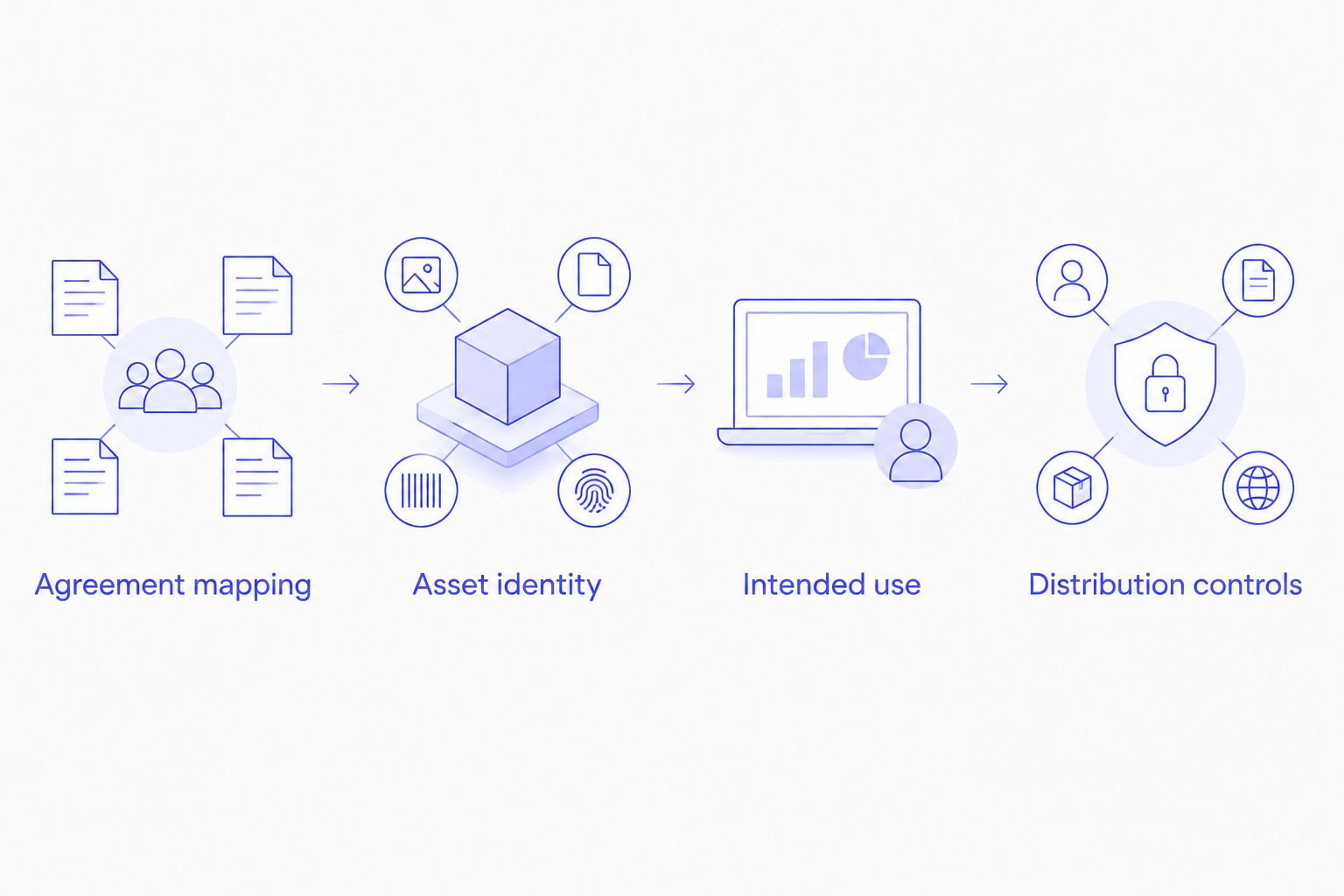
Agreement mapping
- Create a rights record for each executed agreement or distinct permission grant. Give it a persistent Rights record ID, and retain the Agreement reference, Creator ID, Effective date, End date and Rights owner.
- Add structured fields for Permitted channels, Permitted uses, Territories, Editing permissions and Restrictions. Record paid distribution separately from organic publishing. Preserve conditions that do not fit structured fields in a readable notes field linked to the agreement.
- Define Rights status values such as Unreviewed, Approved, Restricted and Expired. Default new records to Unreviewed; leave uncertain permissions unresolved until the designated reviewer checks the evidence.
Expected result: A reviewer can open a rights record, locate its supporting agreement and identify exactly which uses have been approved.
For a 2026 migration, distinguish a genuinely open-ended grant from an unknown end date. Do not turn blank dates into perpetual permission. Record the agreement's actual wording and route missing information for review.
Configure asset relationships
Asset identity
- Assign a persistent Asset ID when footage enters the library. Store the creator relationship and link the asset to the applicable rights record. Use filenames for readability, never as the only matching key.
- Give each exported edit its own Asset ID and retain its Source asset IDs. A translated cut, cropped version or revised hook needs traceable ancestry. For composites, record every contributing source rather than selecting the easiest one to match.
- Define how permissions are evaluated across those relationships. Where several sources contribute to a video, approve a requested use only when every relevant source permits it. Send conflicting or incomplete records to review.
Expected result: An editor can trace an exported ad back to its source footage and supporting agreements without searching message threads.
Preserve source relationships when files move. Replacing a folder or renaming an export must not silently sever the evidence chain. Test that relationship during your 2026 library cleanup before importing the remaining footage.
A creator agreement also does not establish permission for every element inside a video. Record any separate clearance requirements for music, other identifiable people or supplied third-party material, and send unresolved elements to the appropriate reviewer.
Configure the permission gate
Intended use
- Create a reuse request containing Asset ID, Destination, Use type, Territory, Planned start and Planned end. Include the publishing identity when the request involves distribution through a creator's account.
- Compare the request with the applicable permission records. Require an approved status, matching scope and a permitted date range. Treat missing fields, ambiguous restrictions and missing source relationships as review conditions rather than approvals.
- Write the result into a separate Release status field, with the decision reason and reviewer or automation identity. Keep Creative approval separate so a strong hook cannot override a rights restriction.
Expected result: A file becomes eligible for the requested placement only after its documented permissions match that placement.
Your 2026 launch gate should answer a specific question: can this exact asset run in this exact destination during this exact period? A library-wide approved badge is too broad when permission differs by channel or territory.
A release gate has two parts: the decision and its enforcement. A metadata-only approval tells users what they should do; a connected export restriction or publishing check controls what they can do. Document which control your implementation actually provides.
Configure updates and distribution controls
Distribution controls
- Trigger a review when a rights record changes, an asset gains a new source relationship or a permission period ends. Use supported webhooks or scheduled checks, and log the last successful evaluation so failed runs remain visible.
- Update affected assets by persistent ID. Store an Agreement revision, Evaluated revision and Last checked value. Make retries safe by updating the existing record instead of creating duplicate permission entries.
- Maintain a placement register connecting Asset ID to campaign, ad or publishing references and a responsible owner. When approval changes, restrict future use through supported controls and create an explicit action for existing placements. Record confirmation after the owner completes that action.
Expected result: A permission change identifies affected files and placements, with an accountable owner for each required action.
For your 2026 implementation, test a valid request, an expired grant, a prohibited channel, an unmatched asset and a composite with conflicting permissions. These are test scenarios, not proof that your DAM automatically controls every distribution destination.
Do not mark a running placement stopped merely because a notification was sent. Require downstream confirmation, whether that comes from a supported integration or the person managing the campaign.
Recheck assets whenever an agreement changes
The adjacent workflow starts with an amendment rather than a new upload. It is best for evergreen creative, where an existing asset remains useful after its original permission period.
- Retain the previous agreement evidence and attach the executed amendment to the rights record.
- Update only the permissions the amendment changes. A longer term does not establish additional channels, territories or editing rights.
- Find every linked original, derivative and active placement. Recalculate eligibility against each placement's intended use.
- Send unresolved restrictions to review and confirm downstream actions before closing the change request.
Use the evergreen UGC rights renewal workflow when planning the renewal process around retained creative.
| Workflow | Best for | Benefit | Limitation |
|---|---|---|---|
| Upload-triggered check | New footage and first-use approval | Establishes evidence before distribution | Does not catch later agreement changes by itself |
| Agreement-change check | Renewals, restrictions and existing edits | Reassesses assets already in the library | Depends on complete asset and placement relationships |
Use both workflows for an active library. Upload checks establish the initial decision; agreement-change checks keep that decision aligned with current evidence.
Troubleshooting
A permitted asset keeps failing review
Inspect the failed condition before changing the status. Check date interpretation, territory naming, channel values and the planned end date. Normalize structured values, but preserve the agreement's meaning; a naming mismatch needs mapping, while a missing permission needs review.
A renewed original leaves its edits marked expired
Check whether the edit references the original asset and current rights record. Repair missing relationships, then rerun the evaluation for all affected derivatives. Avoid manually approving each edit, which leaves the underlying connection broken.
The integration creates duplicate records
Match incoming changes by persistent asset and rights identifiers. Store processed event references where supported, and make repeated updates produce the same final state. Do not match on creator display names or filenames, which can change.
Expired creative is still running
Inspect the placement register and downstream action log. Restrict future reuse, identify the current campaign owner and confirm the required stop or replacement action. DAM status alone is not evidence that an ad platform received or completed an instruction.
A creator-account ad fails despite valid usage rights
Check account authorization separately from the content license. Platform authorization and contractual permission are distinct requirements; an active agreement does not prove that an account-level authorization is active. Track both conditions before releasing the placement.
Customize your workflow
Extend the same asset identity into creative testing and performance reporting. Keep the asset's hook, angle, creator and campaign references alongside its permission record, so the team can find reusable winners without treating performance as authorization.
The Viral App manages UGC programs involving 5–60 creators and 300–3,600 videos/month. At that operating scope, rights records need to remain connected through sourcing, approvals, editing and distribution. The agency also handles briefs, scripts, posting schedules, payments and reporting; those responsibilities are separate from the technical controls supplied by your DAM.
The Viral App's 90-day program gives clients a choice between full transfer of creator relationships, processes, tracking tools and playbooks or continued management. If ownership transfer is your goal, include rights-field definitions, agreement access, integration credentials and unresolved review queues in the handoff plan. This is an implementation recommendation, not a claim that a particular DAM connector is included.
Plan your creator workflow
Discuss campaign operations, approval responsibilities and the handoff your app team needs.
FAQ
How do I connect UGC usage rights to a digital asset management system?
Link each asset to a structured rights record backed by agreement evidence, then check every reuse request against that record. Add update handling for amendments, expiry and derivative assets, plus a register of active placements.
Can a DAM automatically stop ads when creator rights expire?
A DAM can stop downstream ads only through a supported, configured control that reaches the relevant advertising system. Otherwise, assign the campaign owner a stop or replacement action and require completion evidence.
Which metadata fields should I create for UGC rights?
Create persistent asset and rights IDs, an agreement reference, permission scope, dates, restrictions and a review status. Keep source relationships and placement references so changes reach edits and active campaigns.
Does organic publishing permission include paid advertising?
Do not treat organic publishing permission as approval for paid advertising. Check the agreement for the intended paid use, and track creator-account authorization separately when the placement requires it.
What happens to edited videos when an agreement is renewed?
Reevaluate every linked edit against the amended permission record and its intended placement. Extend only the permissions covered by the amendment, and retain the prior agreement evidence.
Can The Viral App manage the campaign around this workflow?
The Viral App manages UGC campaign operations including creator sourcing, vetting, briefs, approvals, posting schedules, payments and reporting. Confirm DAM configuration and integration responsibilities during scoping rather than assuming a specific connector is included.
One last thing
Test a restriction change before you test a renewal. Renewals add permission; a restriction exposes whether your process can identify affected edits, reach active placements and obtain confirmation from the responsible owner. Run that test before your next 2026 campaign handoff.