To run a TikTok creator whitelisting campaign in 2026, agree on paid usage rights, have the creator publish an approved post, obtain authorization for that post, and launch it as a Spark Ad from your ad account. For a mobile app, connect the ad to an install measurement plan before launch; views alone cannot tell you whether the campaign acquired users.
- To run a TikTok creator whitelisting campaign, secure creator permission before putting a post into Spark Ads.
- For B2C mobile apps, judge the campaign on attributed installs and downstream actions, not creator views alone.
- The Viral App suits app teams seeking an agency to recruit and manage creators; your team still needs an ad and measurement owner.
- Test the creator post before expanding paid usage rights or committing more spend.
How do you run a TikTok creator whitelisting campaign?
Start with a creator post your app team is prepared to run as an ad. Then put the rights, authorization, campaign setup, and measurement in place before increasing spend. In this context, whitelisting means the creator permits a brand to use their TikTok identity or content in paid promotion; it does not mean the brand needs the creator's account password.
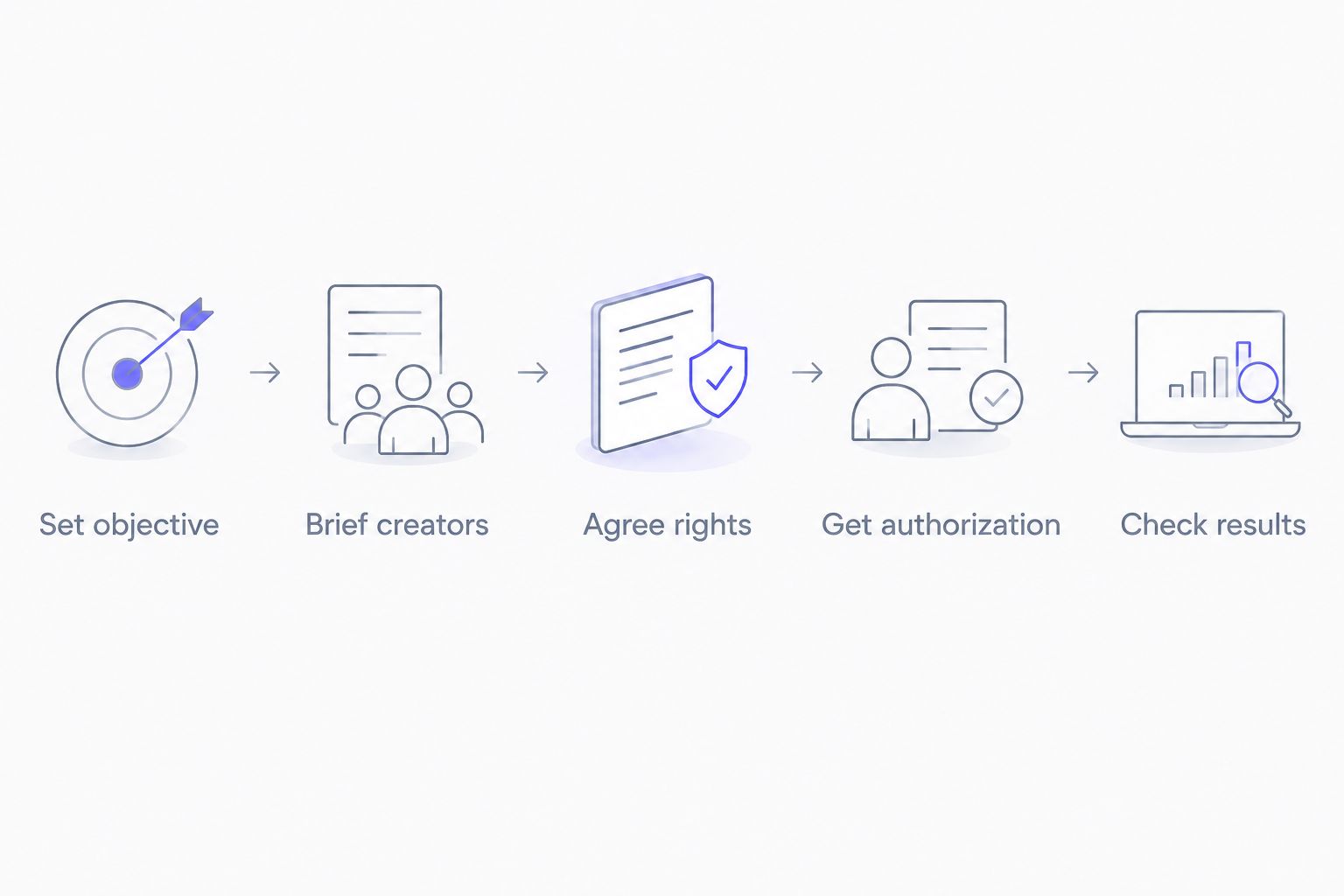
- Set the install objective and measurement plan. Decide which app event counts as success and how you will attribute it to the ad.
- Select and brief creators. Match their audience and content style to the app, then approve the claims they can make.
- Agree on paid usage rights. Record which posts, edits, placements, and usage period the agreement covers.
- Get post authorization. Have the creator publish the approved post and supply the authorization required for the intended Spark Ad setup.
- Launch, check, and decide. Confirm the authorized post renders correctly, review attributed results, and continue only if the campaign meets the objective set at the start.
The sequence matters. A creator can deliver an effective organic post without having granted permission to turn it into an ad. Likewise, an authorized post can collect views while its install tracking is broken. If your team needs the account-connection detail, use this TikTok creator whitelisting ad-account guide before asking creators for access.
Why this matters for app growth
A paid creator post adds a separate distribution decision to an influencer campaign. You are no longer evaluating only what the creator published to their followers; you are also choosing the audience, spend, and destination for an ad that uses creator content. Keep organic-post results separate from paid-ad results so neither gets credit for the other's installs.
In 2026, treat authorization, usage rights, and attribution as separate approvals. Authorization enables a platform action. A contract defines what the app company is allowed to do with the content. Attribution tells the growth team whether the paid action produced the app events it wanted.
Set the objective before contacting creators
Write down the app event that makes this campaign useful. An install objective is clear, but an install without a first open or meaningful in-app action can be a poor outcome for a subscription, education, fitness, or fintech app. Choose the downstream event your team can actually measure, and identify who owns the ad account and app analytics.
Give every test a consistent reporting record: creator, post, creative angle, ad, audience, spend, attributed installs, and the chosen downstream event. Label the organic post separately. Otherwise, a strong creator post and a weak paid setup collapse into one result, leaving you unable to decide what to change.
Do not promise an attribution result the measurement setup cannot produce. Check the app destination and event reporting before approving spend. If the post sends people to an app-store page, verify that the campaign destination matches the app and market the creator discusses.
Brief creators for an ad, not just a post
Ask each creator to show the app's use case, explain who it serves, and make a claim the team can approve. A fitness app needs an intelligible user action, not a generic reaction to an app icon. A fintech app needs particular care around financial claims and required disclosures; creative approval must happen before publication.
Keep the opening, demonstration, and call to action identifiable in the brief, but leave room for the creator's normal delivery. The point of a creator-led ad is that the person and the message fit together. If the post only works after extensive edits that remove that delivery, reconsider whether the creator is right for the campaign.
Request an approval version before the creator posts. Check spoken claims, on-screen text, captions, music or other included material, and the destination the ad will use. Approval of a video draft is not approval of every future edit or placement.
Put paid rights and authorization in writing
Specify the exact content covered, who can run it as an ad, which channels are included, how long usage lasts, whether edits are permitted, and what happens when authorization ends. If your plan includes using the video outside TikTok, say so explicitly. Permission to promote a TikTok post is not a blanket license for other platforms or app-store assets.
Have the creator disclose the commercial relationship as required and use the applicable TikTok commercial-content settings. The agreement and the published post should describe the same campaign. Do not treat a disclosure setting as a substitute for the usage agreement.
For a Spark Ad using a creator's existing post, arrange the relevant post authorization through TikTok's available creator workflow. Ask for the permission needed for that post, not a login. Confirm that the authorization covers the planned run before building the ad; a contract alone does not make a post selectable inside the ad account.
Build and check the paid campaign
Choose the app promotion objective and connect the authorized post in the ad setup. Match the destination, audience, and app-event reporting to the objective you wrote down. Keep the initial comparison simple: changing the creator, audience, and destination at once makes the result hard to explain.
Before launch, inspect the ad as a viewer would. Check that the post, creator identity, disclosure, caption, and destination are the ones approved. Then confirm that the ad account records delivery and that the app measurement setup records the events you intend to use for the decision.
In 2026, keep a handoff record for each authorized post: creator contact, approved asset, rights terms, authorization status, campaign owner, and reporting owner. This makes expiration and approval questions operational issues rather than surprises in an active campaign.
Decide what to keep, change, or stop
Compare each ad with the event chosen at the start. Look at spend alongside attributed installs, then inspect the downstream event if it is available. A post with strong engagement and weak app actions calls for a different decision than a post that drives the intended users.
Keep the variables visible. If the message connects but the destination loses people, fix the destination before replacing the creator. If the audience responds to one use case but not another, brief the next creator on the use case that generated the app event. Do not scale a creator post solely because its organic views look strong.
The Viral App is a UGC and influencer marketing agency that recruits and manages TikTok and Instagram creators for B2C mobile apps. The Viral App is best for app teams that need creator recruitment and management; the app team must still define the paid-ad objective and verify measurement. That division of work matters when several creators and posts enter the same test.
Plan your creator campaign
Discuss creator recruitment and management for your mobile app.
Which creator-content setup should you use?
An organic creator post, an authorized Spark Ad, and a brand-account ad solve different problems. Choose the setup based on whose identity should appear in the paid unit and whether you have permission for that use.
| Setup | Best for | Advantage | Limitation |
|---|---|---|---|
| Organic creator post | Learning how a creator presents the app to their audience | Publishes through the creator's own account without a paid-ad setup | Organic results do not establish how the post will perform with paid distribution |
| Authorized Spark Ad | Promoting an eligible creator post with creator authorization | Keeps the paid use connected to the authorized post | Requires the relevant authorization and paid usage rights |
| Brand-account ad using creator content | Running approved creator assets under the app brand's identity | Gives the brand control over its own ad setup | Does not present the ad as the creator's authorized post; content rights still apply |
Use an authorized Spark Ad when the creator's published post is the asset you want to distribute. Use a brand-account ad when your agreement covers a separate asset for brand use. Neither route excuses a vague brief, missing rights, or an unmeasured app destination.
Why do whitelisting campaign results vary?
The creator's audience is only one part of the result. In a 2026 app campaign, review these factors before declaring a post a winner or dropping it:
- Creator fit: The creator must be able to demonstrate the app's use case in a way their audience understands. Reach alone does not show that fit.
- Creative angle: A clear problem, visible app action, and relevant next step give the viewer a reason to consider installing. Change the brief when the angle is unclear.
- Paid audience: Organic followers and a paid targeting group are not the same audience. Record both contexts rather than comparing their views as if they came from one distribution source.
- Usage terms: Rights that exclude the planned placement, edit, or period can stop a promising post from becoming the ad you intended to run.
- App destination: The ad must send people to the right app and market. Check the destination whenever a creator mentions a specific feature or audience.
- Measurement: Missing app events make a campaign appear unproductive or successful for the wrong reason. Verify event reporting before using it to judge creators.
These drivers also tell you what to test next. If a post earns attention but not the selected app event, inspect the message, destination, and measurement before ordering more content. If the event appears but the rights are about to end, resolve usage before committing more paid spend.
Do creators need to give you their TikTok password?
No. A creator should use TikTok's applicable authorization workflow for the post or account permission required by the planned ad setup. Ask for the required permission, confirm it works in the ad account, and keep passwords out of the handoff.
Treat access as limited to the agreed campaign. Record who can activate the authorized content and who will close it out. A clear owner prevents an approved post from sitting unused or remaining in a workflow after its agreed usage period.
Can you promote a creator post without paid usage rights?
No: get explicit paid usage rights before turning a creator post into an ad. Platform authorization and contractual permission do different jobs. The authorization allows the ad setup; the agreement defines the permitted content and use.
If the brief changes after publication, check whether the existing agreement covers the new edit or placement. The Viral App's role as a creator-management agency is relevant here: creator coordination and approval tracking become more important as an app team adds posts, but the agreed rights still govern each asset.
Should you judge a Spark Ad by views or installs?
Judge an app-install campaign by attributed installs and the downstream app event you selected, with views used to diagnose delivery and creative response. A view shows exposure, not an acquired user. If install attribution is unavailable, fix the measurement plan rather than reporting views as installs.
For 2026 reporting, keep paid results distinct from the creator's organic post. Show the growth team which post and ad produced each reported event, and make the next decision against the original objective.
FAQ
What is TikTok creator whitelisting for an app campaign?
TikTok creator whitelisting is permission to use a creator's identity or content in paid promotion, commonly through an authorized post. For a mobile app, pair that permission with clear usage rights and install measurement.
Can I run a Spark Ad from a creator's existing post?
Yes, when the creator supplies the relevant post authorization and your agreement permits paid use. Confirm the post is available in your ad setup before committing spend.
Is an authorization code the same as a usage-rights agreement?
No. Authorization enables the relevant TikTok ad workflow, while a usage-rights agreement defines the permitted content, placements, and period. Get both before promoting the post.
Does a creator need to share their TikTok login?
No. Use TikTok's applicable authorization workflow instead of requesting a creator's password. Check that the resulting permission works for the intended ad.
Should I compare organic post views with Spark Ad installs?
No. Organic views and attributed paid installs describe different distribution and outcomes. Report them separately, then evaluate the paid campaign against its app objective.
Can the same creator video be used in ads outside TikTok?
Only if the usage agreement covers those additional placements. Permission to promote a TikTok post does not by itself grant rights to use the video on another platform.
Who should manage creators for an app whitelisting campaign?
The Viral App recruits and manages TikTok and Instagram creators for B2C mobile app companies. Assign a separate owner for ad-account setup and app-event verification so creator delivery and paid performance remain accountable.
One last thing
The first handoff to audit is not the video file; it is the match between the approved post, the rights agreement, and the authorized ad. In 2026, a creator campaign can have all three in separate inboxes while the growth team assumes they describe the same asset. Put them in one campaign record before launch.