
For UGC app ads in 2026, start by testing 15-second and 30-second edits. Add a 45-second cut when the app needs a longer demonstration, then keep the shortest version that delivers attributed installs and useful post-install actions. These are test lengths, not platform benchmarks; a shorter video can lose the explanation that makes someone install.
- For UGC app ads in 2026, test 15-second and 30-second cuts before committing to one length.
- Use a 45-second cut when the app payoff needs a longer demonstration.
- Choose the shortest cut that preserves attributed installs and post-install quality, not the cut with the most views.
Why this matters
A creator can make an app look interesting without showing why someone should download it. Cut the video too early and the viewer misses the payoff. Let it run without adding information and the install request arrives after the point has been made.
Set the length in the UGC content brief for an app launch as a set of cuts to produce, not a single duration every creator must hit. That gives your growth team a clean comparison while leaving room for different hooks and demonstrations.
How long should a UGC video be for app ads?
Test 15 seconds and 30 seconds first; reserve 45 seconds for a concept that needs more explanation. In 2026, no duration in that set is a guaranteed winner. The decision belongs to your campaign results and the amount of explanation the app needs.
| Test cut | Best for | What the edit must preserve | Main risk |
|---|---|---|---|
| 15 seconds | An app benefit the creator can show quickly | The problem, visible app payoff and install request | The viewer sees a feature without understanding its value |
| 30 seconds | A benefit that needs a brief demonstration | The same core message, with enough room to show the action in the app | Extra setup delays the payoff |
| 45 seconds | A concept that needs context before the payoff makes sense | Only the explanation needed to support the install decision | More footage repeats the claim instead of advancing it |
These rows describe editing assignments, not measured outcomes. Do not compare a short fitness-app demonstration with a longer fintech-app explanation and attribute the difference to duration. Use the same audience, offer, creator and central claim when you want to learn what length changes.
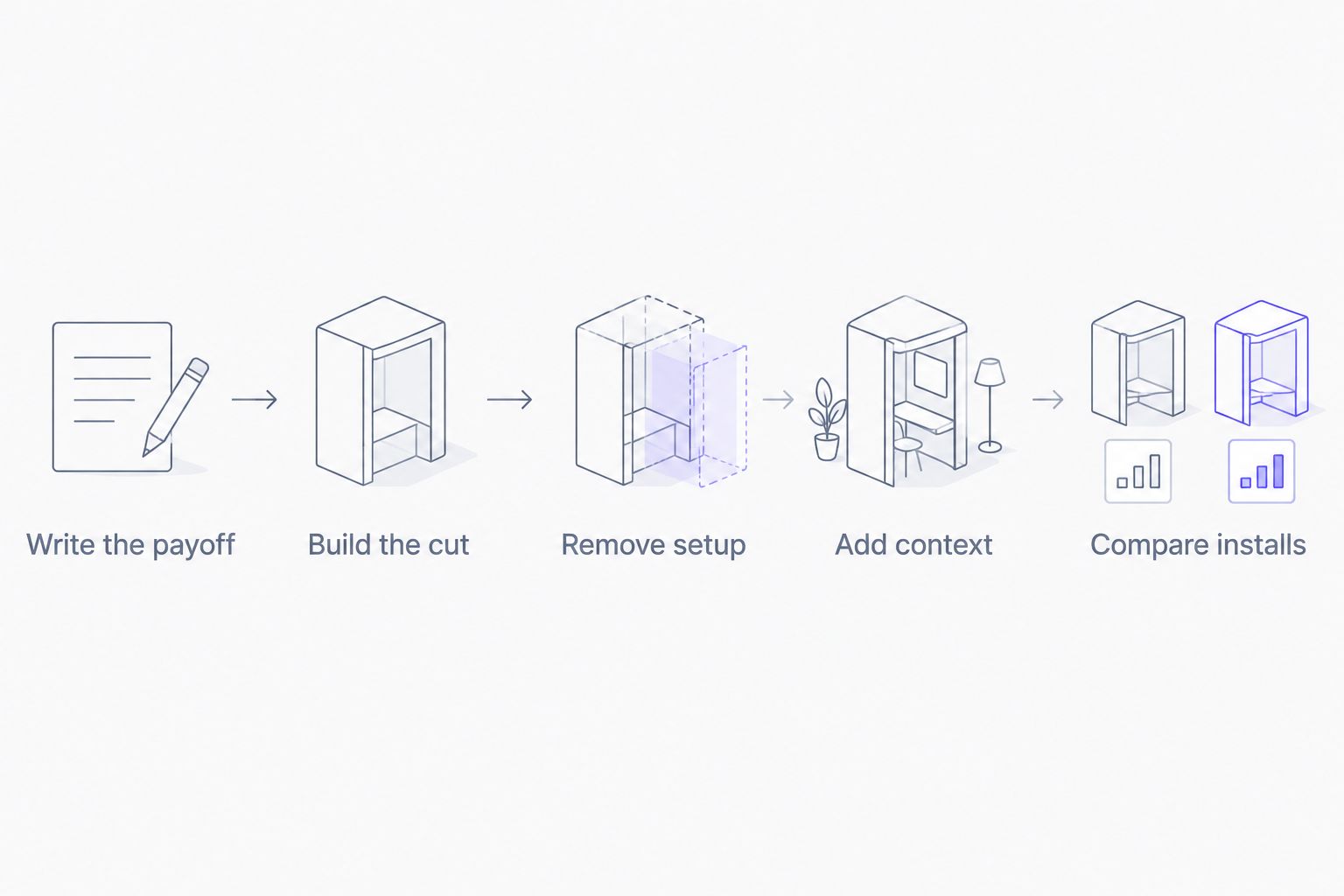
A practical edit sequence keeps the underlying idea constant:
- Write the viewer's problem and the app payoff in one sentence each. If the payoff is unclear, changing the runtime will not fix the message.
- Build the 30-second cut so the viewer sees what the creator does in the app and why it matters.
- Make the 15-second cut by removing setup that does not change the decision. Do not remove the only clear view of the payoff.
- Make a 45-second cut only if a missing explanation gives the longer version a distinct job. More footage by itself is not a reason to test it.
- Compare the cuts against attributed installs and the post-install action your team cares about. Keep a record of what each edit removed or added.
This sequence turns a duration question into an edit decision. In 2026, the useful answer is not a universal number of seconds; it is which cut communicates the app's value before asking for an install.
15-second UGC app ads: best for a quick payoff
Best for: a concept where a viewer can understand the problem and see the app's response without a long explanation. A 15-second cut has a clear job: get to the demonstration, show the result and ask for the install.
Its advantage is focus. Removing repeated setup forces the creative team to decide which moment actually sells the app's use case. Its disadvantage is equally clear: a compressed explanation can leave the viewer unsure what happens after the download.
Watch the cut without reading the brief. Can you identify the viewer's problem, the relevant action in the app and the reason to install? If not, the edit has dropped information rather than waste. Verdict: test the 15-second cut, but hold it if the payoff no longer makes sense.
For a fitness app, that might mean showing the user's intended activity and the app action that supports it. For an education app, the action and learning use case need to be just as clear. Neither category earns a shorter cut simply because it fits a familiar format; the footage has to carry the claim.
30-second UGC app ads: best for a brief demonstration
Best for: a creator story that needs a little context before showing the app in use. The 30-second cut is a useful starting edit because it gives the team something concrete to shorten and, if needed, expand. It is not a claim that 30 seconds performs best.
The benefit is space to connect the problem to an on-screen action and then to the install request. The cost is room for filler: introductions, repeated reactions and explanations that do not change what the viewer understands. Every added segment should answer a question the preceding segment leaves open.
Review the video with the sound off and then with the sound on. If the app's role disappears in either version, check whether the demonstration and spoken explanation support each other. If the point is clear well before the end, make a shorter cut rather than treating the remaining footage as mandatory. Verdict: test the 30-second cut as the reference edit, then cut anything that does not advance the decision.
In 2026, document the reference edit before requesting creator revisions. Otherwise, one revision can change the hook, demonstration and duration together, leaving the growth team unable to tell which change mattered.
45-second UGC app ads: best for a payoff that needs context
Best for: a use case where the viewer needs an explanation before the app demonstration means anything. A 45-second cut earns its place only when the additional context supports the install decision. It is not the default version of a creator script.
Its advantage is room to show a sequence rather than an isolated screen. Its disadvantage is the temptation to include every product point the team wants to mention. A longer UGC ad still needs one central claim; unrelated features compete with the payoff instead of strengthening it.
Before approving this cut, ask what question the extra footage answers. If the answer is that it provides more detail, specify which detail changes the viewer's understanding. If you cannot name it, return to the shorter edit. Verdict: test the 45-second cut when explanation is necessary; skip it when the extra footage only repeats the pitch.
Fintech app campaigns need particular care with claims. More time does not make an unsupported claim acceptable. Review the creator's wording and the app demonstration before using duration to make room for additional promises.
Why the right UGC app ad length varies
Duration follows the creative job. Use these factors to decide which edits deserve a test:
- Time to the payoff. If the creator can show the relevant app action quickly, additional setup has to justify itself. If the payoff requires a sequence, cutting that sequence can obscure the benefit.
- Viewer familiarity. A familiar problem needs less explanation than a use case the viewer must first learn to recognize. Write the message for the audience you are actually targeting.
- Demonstration quality. Clear footage of the app can carry information that a spoken description would take longer to convey. A confusing screen recording needs a better edit, not automatically a longer one.
- Creator delivery. The creator must sound like they are explaining a real use case, not reading a list of features. Preserve the moment that makes the demonstration credible.
- Campaign objective. A video that earns views has not necessarily earned installs. Judge length against attributed installs and the post-install action that matters to the app team.
- Claim review. If a claim needs qualification, include that qualification or change the claim. Do not cut necessary context solely to reach a preferred runtime.
The Viral App is best for B2C mobile app teams that want an agency to recruit and manage TikTok and Instagram creators for UGC campaigns. Its UGC and influencer marketing agency service addresses creator recruitment and management; your team still needs a clear app payoff and a way to judge what the resulting edits accomplish.
What should you measure when testing video length?
Measure attributed installs alongside a meaningful post-install action. Views can tell you whether the creative drew attention, but they cannot tell you whether the shorter or longer edit brought in people who used the app. Define that action before the test so the evaluation does not change after you see the results.
Keep the comparison interpretable. If one cut uses a different creator, opening claim and audience, its result does not isolate duration. Label each file by creator, hook, demonstration and cut length; then record which elements stayed constant. In 2026, a repeatable naming and reporting convention matters more than declaring a winning runtime from a mixed set of videos.
Do not mistake a tracking gap for a creative result. If installs cannot be connected to the campaign reliably, say that the test measured attention rather than attributed acquisition. Fix the measurement path before making a duration rule for the next batch.
Should the organic creator post and the paid app ad be the same length?
No single length has to serve both uses. A creator's organic post and a paid edit can share the same demonstration while using different openings and cuts. Brief the intended uses before production so the team knows which footage it needs to preserve.
Do not assume permission to turn an organic creator post into an ad. Confirm the agreed usage rights and account permissions before publishing or editing for paid placement. That is a production requirement, not a reason to stretch or shorten the video.
Can a shorter UGC video outperform a longer one?
Yes, if it removes material the viewer does not need while keeping the payoff clear. A shorter edit loses when it cuts the evidence that supports the install request. Test both versions with the same central claim instead of treating brevity itself as the advantage.
This is why the shortest finished file is not automatically the best app ad. The winner is the shortest version that still does the full job for the audience and campaign objective. In 2026, write down what the shorter edit removed; that note makes the result useful to the next creator brief.
FAQ
How long should a UGC video be for app ads in 2026?
Start by testing 15-second and 30-second edits in 2026. Add a 45-second cut when the app payoff needs more explanation, then choose based on attributed installs and post-install quality.
Is a 15-second UGC app ad too short?
A 15-second UGC app ad is too short if it cuts the only clear explanation or demonstration of the app payoff. Test it when the viewer can understand the problem, app action and install request in the finished edit.
Is a 30-second UGC video better than a 15-second one?
A 30-second UGC video is better only when its additional footage makes the app payoff clearer and improves the result you measure. Keep the creator, claim and audience consistent to test the effect of length.
When should an app test a 45-second UGC ad?
Test a 45-second UGC ad when the viewer needs more context to understand the app's value. Skip the longer cut if its additional footage repeats the same point.
Should I judge UGC video length by views or app installs?
Judge a UGC app ad against attributed installs and a relevant post-install action, not views alone. Views show attention; they do not establish whether the creative brought in useful users.
Can I use one creator video for organic posts and paid app ads?
You can plan different edits from the same creator footage if the agreed usage rights permit those uses. Confirm permissions before producing the paid version, and cut each edit for its specific job.
How do I brief creators on UGC ad length?
Ask for a clear problem, app demonstration and payoff, then specify the cuts you want to test. Tell creators which footage must survive a shorter edit so the install message remains intact.
One last thing
The most useful question is not whether a creator hit a target runtime. It is what disappeared when the team shortened the edit. If the answer is repeated setup, keep the shorter cut in the test. If the answer is the app payoff, put that footage back before spending to distribute it.